What Is a Website Relaunch?
A website relaunch is a fundamental overhaul of an existing website - in design, technology, and often content structure. Unlike a redesign that only refreshes the visual appearance, a relaunch addresses the entire technical foundation: CMS migration, new URL structure, performance optimization, and SEO migration.
For businesses that use their website as a sales channel, a relaunch isn't cosmetic. It determines whether your website wins or loses customers. An outdated website costs more than just image - it measurably costs revenue through slow load times, poor mobile usability, and declining Google rankings.
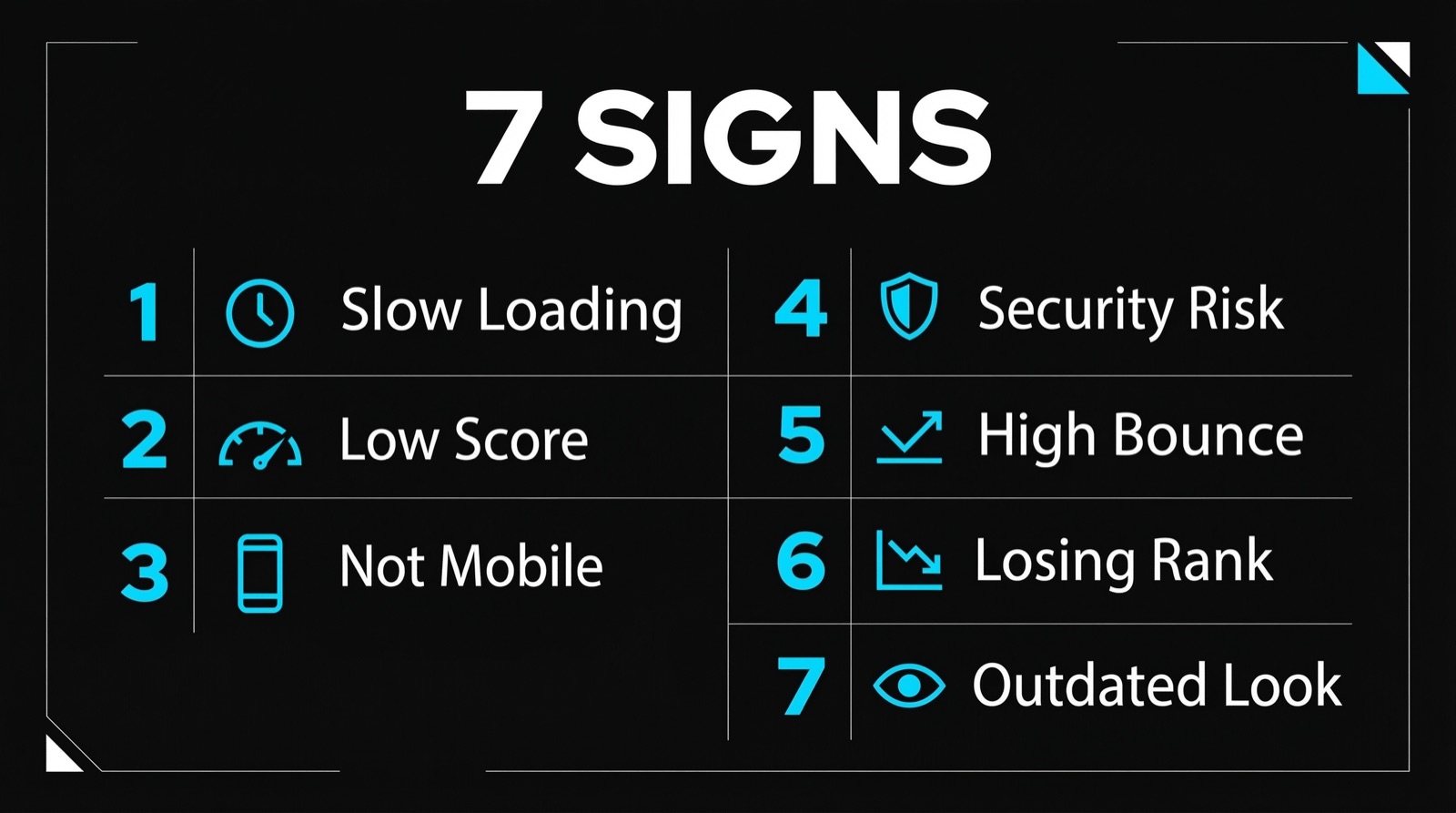
7 Signs Your Website Needs a Relaunch
Not every website needs a relaunch. But if several of these apply, it's time:
1. Load time over 3 seconds. 53% of mobile visitors leave a page that takes longer than 3 seconds to load (Google, 2023). Every second of delay reduces conversion rate by 7% (Aberdeen Group).
2. Lighthouse score below 50. Google PageSpeed Insights shows a score from 0 to 100. Anything below 50 is rated "Poor" and signals to Google that your site is technically outdated. In our project for Dub@i Möbel, we achieved a Lighthouse score of 98.
3. No responsive design. Over 60% of web traffic comes from mobile devices. If text overlaps, buttons are too small, or forms break on smartphones, you're losing the majority of your visitors.
4. Outdated CMS with security vulnerabilities. WordPress plugins without updates, end-of-life PHP versions, or known template vulnerabilities - security risks aren't just an IT problem, they're a business risk.
5. Bounce rate above 60%. A high bounce rate is a clear signal: visitors can't find what they're looking for, or the site delivers a poor user experience.
6. Declining Google rankings. If your key keywords have lost positions over the past 12 months, the cause is often technical SEO issues that only a relaunch can fundamentally resolve.
7. The website no longer reflects your business. New services, changed branding, a grown team - if your website doesn't represent who you are today, it damages credibility.
Planning: The 5 Phases of a Website Relaunch
A professional relaunch follows a clear process. Skipping phases costs you lost rankings and technical problems post-launch.
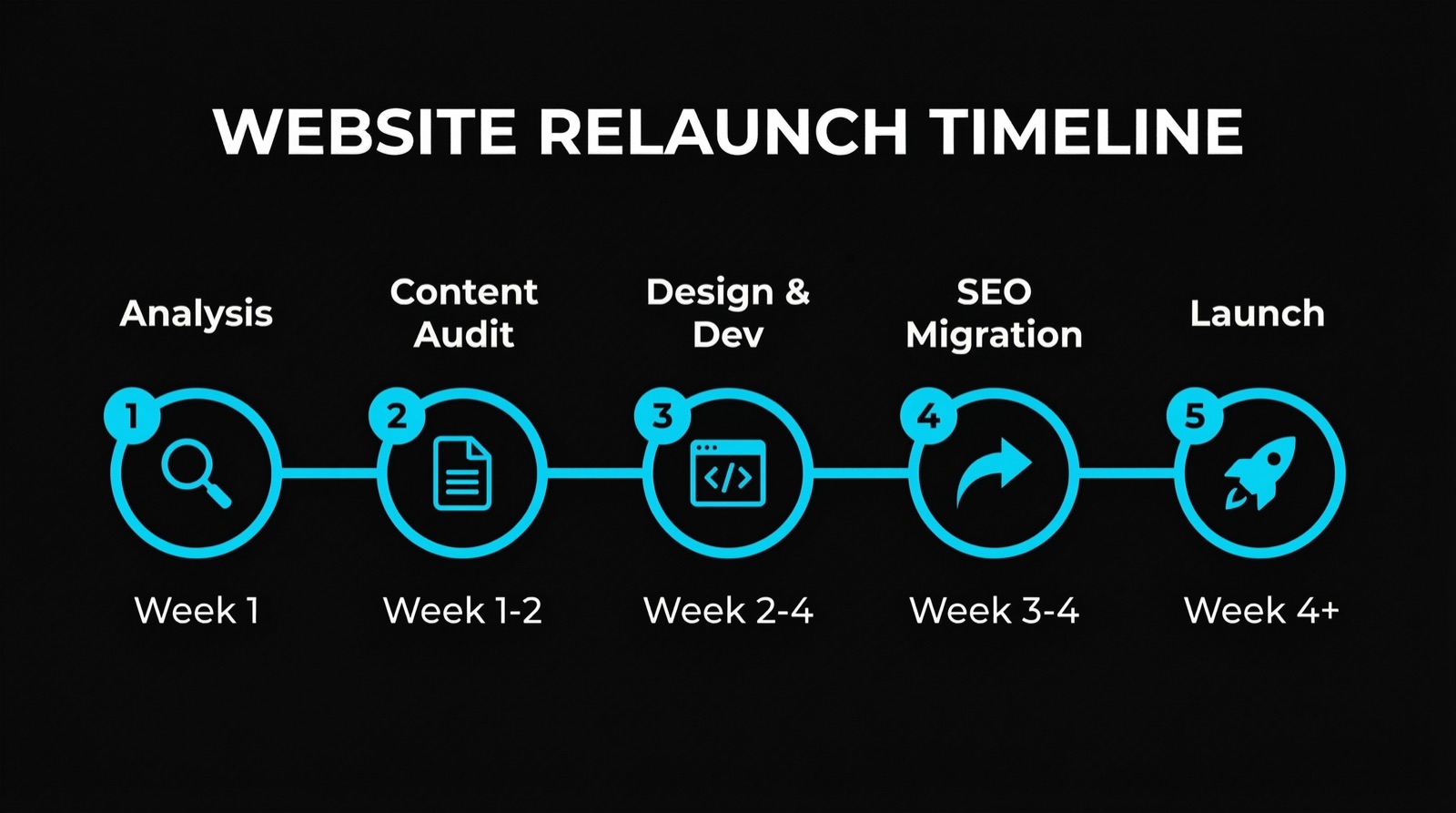
Phase 1: Analysis and Goal Definition (Week 1)
Before a single line of code is written, three questions take center stage:
- What's currently working? Google Analytics, Search Console, and heatmaps reveal which pages drive traffic and where visitors drop off.
- Who is the target audience? Buyer personas define what information the website needs and how navigation should be structured.
- What should the website achieve? Lead generation, contact form inquiries, direct appointment booking, or e-commerce? The goal determines the entire architecture.
Phase 2: Content Audit and Information Architecture (Week 1-2)
Every existing URL is cataloged and evaluated:
- Keep: Pages with good rankings and relevant content
- Merge: Thin pages that lack ranking potential on their own
- Delete: Outdated content that's no longer relevant (with 301 redirect)
- Create new: Gaps in the content strategy
The new site structure is visualized as a sitemap diagram. Every page gets a defined target keyword and a clear call-to-action.
Phase 3: Design and Development (Week 2-4)
This phase determines whether the relaunch delivers the promised results:
- Mobile-first design: The design is developed for smartphones first, then expanded for desktop. Not the other way around.
- Performance budget: A maximum load time of 1.5 seconds is set as a technical requirement.
- Conversion optimization: Every page has a primary CTA. Contact options are accessible from everywhere.
- Accessibility: WCAG 2.1 compliance for better usability and legal certainty.
At Webkomodo, we use Next.js as our technical foundation - server-side rendering, automatic code splitting, and edge caching deliver load times under one second.
Phase 4: SEO Migration (Week 3-4)
SEO migration is the most critical part of a relaunch. Mistakes here can cost months of rankings.
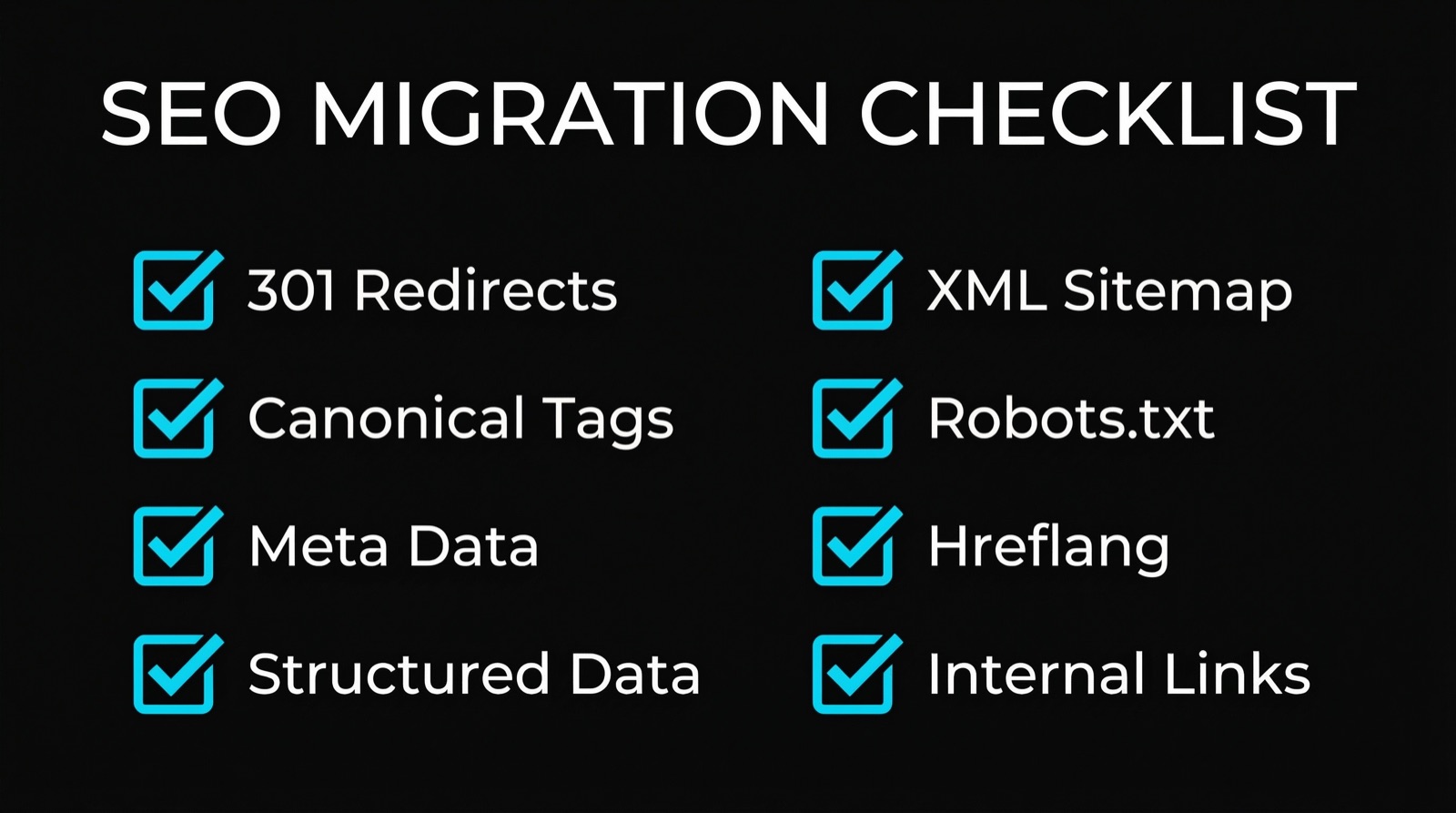
The SEO checklist:
- 301 redirects: Every old URL must redirect to its new equivalent. No exceptions.
- Canonical tags: Every page gets a unique canonical tag.
- Meta data: Title tags and meta descriptions are re-optimized for every page.
- Structured data: Schema.org markup for LocalBusiness, FAQ, breadcrumbs, and more.
- XML sitemap: Create a new sitemap and submit to Google Search Console.
- Robots.txt: Ensure no important pages are blocked.
- Hreflang: For multilingual websites, correctly link language versions.
- Internal linking: Update all internal links to new URLs. No broken links.
Phase 5: Launch and Monitoring (Week 4+)
Launch isn't the end - it's the beginning of optimization:
- Pre-launch checklist: SSL certificate, 404 error page, contact form test, analytics tracking
- Launch day: DNS switch, cache clearing, sitemap submission
- Week 1-2: Check Google Search Console daily (crawl errors, indexing)
- Month 1-3: Monitor rankings and traffic, A/B tests for conversion optimization
Technology: Why the Platform Decision Matters
The choice of technical platform affects performance, security, and ongoing costs for years.
| Criterion | WordPress | Next.js / Custom |
|---|---|---|
| Load time | 2.5 - 5 seconds (average) | Under 1 second |
| Lighthouse score | 40 - 65 (typical) | 90 - 100 |
| Security | Plugin updates required, frequent attack surface | No CMS = minimal attack surface |
| Maintenance costs | $150 - $500/month (hosting, updates, fixes) | $20 - $50/month (Vercel/Netlify) |
| SEO | Plugins required (Yoast etc.) | Built-in natively |
| Scalability | Server limits during traffic spikes | Edge CDN, unlimited scalability |
For businesses using their website as a sales channel, the advantages of custom code are clear. More in our article Custom Code vs WordPress.
What Does a Website Relaunch Cost?
Costs vary significantly depending on scope, complexity, and technical foundation. Here's a realistic overview:
Simple relaunch (5-10 pages):
- Design + development: $3,000 - $8,000
- Content creation: $500 - $2,000
- SEO migration: Included
- Timeline: 2 - 4 weeks
Medium relaunch (10-30 pages):
- Design + development: $8,000 - $20,000
- Content creation: $2,000 - $5,000
- SEO migration: Included
- Timeline: 4 - 8 weeks
Complex relaunch (30+ pages, multilingual, integrations):
- Design + development: $20,000 - $50,000+
- Content creation: $5,000 - $15,000
- SEO migration: Included
- Timeline: 8 - 16 weeks
What matters isn't the price, but the ROI. A relaunch that doubles the conversion rate from 2% to 4% pays for itself within 3 to 6 months for most B2B businesses. Our pricing overview shows concrete packages.
The 5 Most Common Website Relaunch Mistakes
1. No SEO Migration
By far the most common and most expensive mistake. Without 301 redirects, all existing pages lose their rankings. Recovery takes 6 to 12 months - if it happens at all.
2. No Content Audit
Simply migrating all content 1:1 wastes the biggest opportunity of a relaunch. Outdated, thin, or irrelevant content drags the entire domain down.
3. Desktop-First Instead of Mobile-First
Too many agencies still design for desktop first and then "adapt for mobile." The result: functional on phones, but not optimized. Mobile-first means: smartphone first, desktop second.
4. Too Much at Once
A relaunch doesn't have to change everything simultaneously. A phased approach reduces risk: first technology and SEO, then gradual content expansions.
5. No Success Measurement
Anyone who doesn't capture baseline data before the relaunch (traffic, rankings, conversion rate) can't prove success afterward. Google Analytics and Search Console are mandatory - before and after launch.
Case Study: Dub@i Möbel
A concrete example from our work: Dub@i Möbel in Hagen previously had no web presence at all. Their product range was neither visible nor discoverable online. We built a complete Next.js website with cinematic design, an AI room advisor, and trilingual support (DE, EN, TR).
Results after launch:
- Lighthouse score: 98
- Session duration: +65%
- Customer enquiries: 3x more than before
- 3 languages for maximum reach
- AI advisor as a conversion lever
The complete website was built from scratch and is live at dubai-moebel.de.
Key Takeaway
A website relaunch isn't an IT project - it's a sales project. The technical foundation determines how fast your site loads, how secure it is, and how well it ranks on Google. But the real value lies in strategic realignment: better content, clearer conversion paths, measurable results. Plan carefully, migrate your SEO data without gaps, and measure success - then the relaunch becomes the best investment of the year.
FAQ
How long does a website relaunch take?
A professional relaunch typically takes 2 to 8 weeks, depending on scope. A simple business website with 5 to 10 pages can be relaunched in 2 to 4 weeks. Larger projects with 30+ pages, multilingual support, and complex integrations need 8 to 16 weeks. The key is preparation: content audit, keyword strategy, and SEO migration plan should be finalized before development begins. Shortcuts in the planning phase cost time and rankings later.
Will I lose my Google rankings from a relaunch?
Not if the SEO migration is done correctly. The most important step: complete 301 redirects from every old URL to its new equivalent. Additionally, canonical tags, structured data, and the XML sitemap must be updated. In practice, we see a short-term ranking dip of 1 to 2 weeks after a correctly migrated relaunch, followed by improvement within 4 to 8 weeks - because the new site is technically superior. Without proper migration, rankings can be lost for 6 to 12 months.
Should I change the CMS during a relaunch?
If your current CMS limits performance, security, or maintainability, yes. The most common switch is from WordPress to a modern framework like Next.js. The advantages: better load times, fewer security vulnerabilities, lower ongoing costs. The trade-off: the initial investment is higher than a WordPress theme update. For businesses using their website as a sales channel that want to grow long-term, the switch typically pays for itself within 12 months through higher conversion rates and lower maintenance costs.
Founder, Webkomodo
Ready for your project?
Let's find out how we can grow your business digitally in a free consultation.
Free consultation