Why This Comparison Matters
WordPress powers 43% of all websites on the internet. That number gets cited in every WordPress pitch as proof of quality. But popularity is not a performance metric. Internet Explorer was the most-used browser for a decade. That did not make it good.
For businesses that depend on their website to generate leads, close deals, and build trust, the technology behind the site is not a detail. It is a strategic decision with measurable consequences for speed, security, and long-term cost.
This article compares custom-coded websites (built with frameworks like Next.js, Astro, or SvelteKit) against WordPress across the metrics that actually affect revenue: load time, security, and total cost of ownership over 3 years.
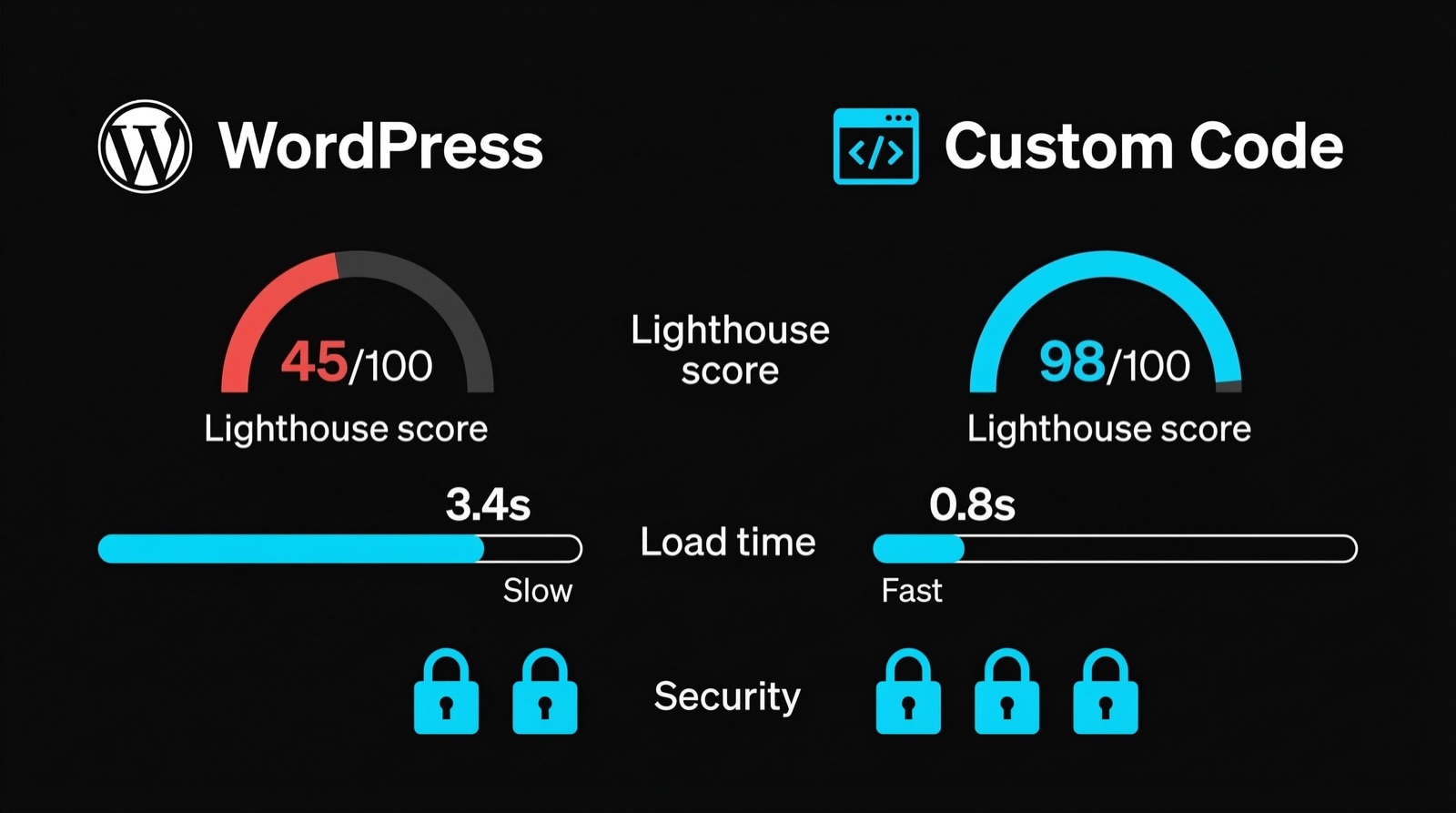
Performance: The Numbers
Google's own research shows that 53% of mobile visitors leave a page that takes longer than 3 seconds to load. Every additional second of load time reduces conversions by 7%. For a site generating 100 leads per month, a 2-second speed improvement could mean 14 additional leads. Per month. Without spending a single euro on ads.
Here is how the two approaches compare on real-world benchmarks:
| Metric | WordPress (Typical) | Custom Code (Next.js/Astro) |
|---|---|---|
| Time to First Byte (TTFB) | 800ms - 2,400ms | 50ms - 200ms |
| Largest Contentful Paint (LCP) | 2.5s - 5.0s | 0.5s - 1.5s |
| Cumulative Layout Shift (CLS) | 0.15 - 0.35 | 0.00 - 0.05 |
| Lighthouse Performance Score | 35 - 65 | 95 - 100 |
| Page weight (homepage) | 2.5 MB - 6 MB | 150 KB - 500 KB |
| HTTP requests | 40 - 120+ | 5 - 15 |
| Core Web Vitals pass rate | ~33% of WordPress sites | ~90% of custom sites |
The difference is not marginal. It is a factor of 5-10x on most metrics.
WordPress sites are slow because of architecture, not negligence. Every page request hits a PHP backend, queries a MySQL database, loads a theme with features you do not use, and pulls in JavaScript from 15-30 plugins. The bloat is structural.
Custom-coded sites built with modern frameworks serve pre-rendered HTML from edge CDNs. There is no database query. No PHP execution. No plugin overhead. The page arrives at the browser ready to display.
What This Means for SEO
Google has used page speed as a ranking factor since 2018 and Core Web Vitals since 2021. Sites that pass all three Core Web Vitals metrics get measurably better rankings than those that fail. Only 33% of WordPress sites pass. The rest are competing with one hand tied behind their back.
For competitive B2B keywords where 10 companies fight for page-one spots, site speed is often the tiebreaker. In our project for Dub@i Möbel, we achieved a Lighthouse score of 98 with Next.js.
Security: Attack Surface Compared
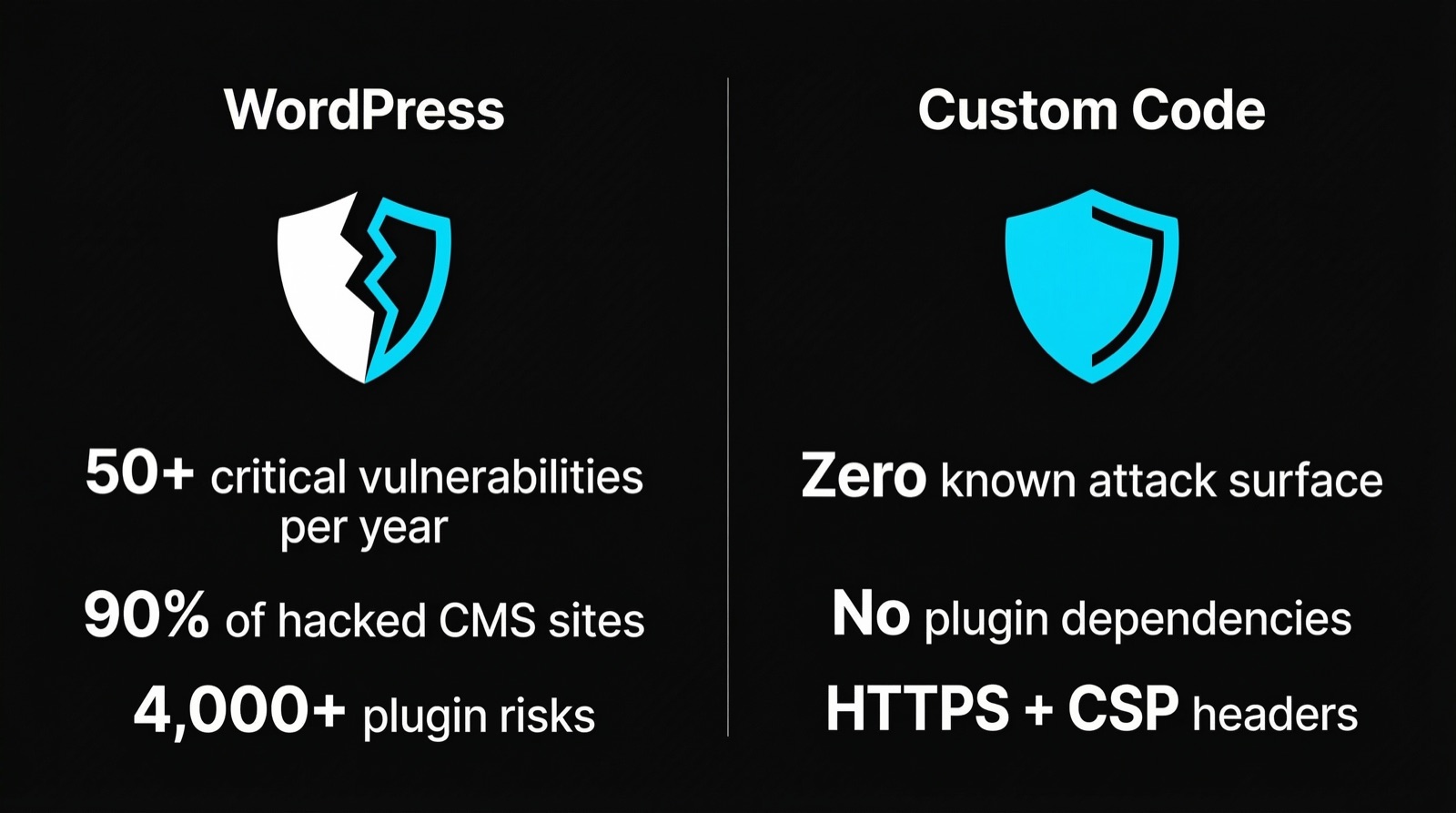
WordPress had 58 documented critical vulnerabilities in 2024. Not total vulnerabilities. Critical ones. The kind that let attackers inject code, steal data, or take over your admin panel.
The problem is not WordPress core alone. It is the ecosystem. The average WordPress site runs 20-30 plugins, each one maintained by a different developer with different security standards. A single outdated plugin is enough to compromise your entire site. Sucuri's annual report found that WordPress accounted for over 90% of all hacked CMS platforms in 2024.
Custom-coded sites have a fundamentally different security profile:
| Security Factor | WordPress | Custom Code |
|---|---|---|
| Known CMS vulnerabilities/year | 50-60 critical | 0 (no CMS to exploit) |
| Plugin attack surface | 20-30 third-party plugins | Zero third-party dependencies on frontend |
| Admin panel exposure | Public /wp-admin URL | No admin panel on production |
| Database injection risk | High (MySQL + PHP) | None (static files, no database) |
| Brute force targets | Login page, XML-RPC | No login endpoints |
| Maintenance required | Weekly updates critical | Quarterly reviews sufficient |
| Hack recovery | Full site rebuild common | Redeploy from Git in minutes |
Static sites have no database to inject, no admin panel to brute-force, and no plugins to exploit. The attack surface is effectively zero. You cannot hack a folder of HTML files served from a CDN.
For companies handling sensitive customer data, operating in regulated industries, or simply wanting to avoid the cost of a security breach (average: 4.45 million USD globally according to IBM's 2023 report), this difference matters.
3-Year Total Cost of Ownership
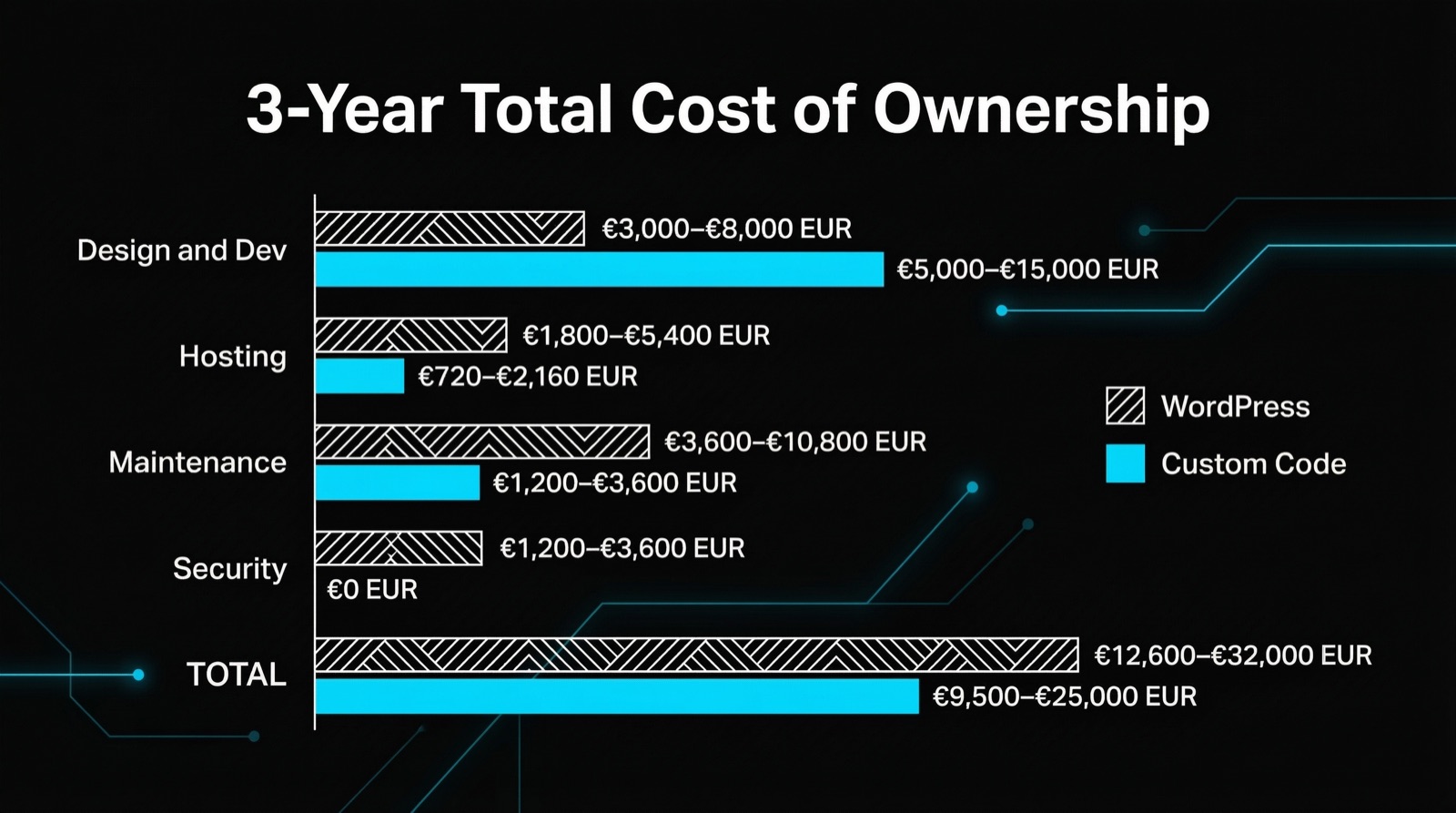
The most common argument for WordPress is cost. "It's free," people say. The software is free. Everything else is not.
Here is a realistic TCO comparison for a professional B2B website:
| Cost Category | WordPress (3 Years) | Custom Code (3 Years) |
|---|---|---|
| Initial build | 3,000 - 8,000 EUR | 8,000 - 20,000 EUR |
| Premium theme | 50 - 200 EUR | 0 EUR (custom design) |
| Premium plugins (yearly) | 300 - 1,200 EUR/yr | 0 EUR |
| Managed hosting | 300 - 1,200 EUR/yr | 0 - 240 EUR/yr (Vercel/Netlify) |
| Security monitoring | 200 - 600 EUR/yr | 0 EUR |
| Maintenance & updates | 1,200 - 4,800 EUR/yr | 300 - 1,200 EUR/yr |
| Performance optimization | 500 - 2,000 EUR/yr | 0 EUR (fast by default) |
| Hack recovery (probability-adjusted) | 500 - 1,500 EUR/yr | 0 EUR |
| 3-Year Total | 10,500 - 32,000 EUR | 8,900 - 23,600 EUR |
The initial build cost for custom code is higher. Everything after that is lower. By year 2, most custom sites are cheaper than their WordPress equivalents. By year 3, the gap is significant.
The hidden costs are what kill WordPress budgets. Plugin license renewals. Emergency security patches. Performance consultants to fix what the plugins broke. Redesigns when the theme stops being supported. These costs are unpredictable and recurring.
Custom sites built on modern frameworks deploy from version-controlled code. Updates are deliberate, tested, and reversible. There are no surprise costs from plugin conflicts or compromised admin panels.
When WordPress Still Wins
WordPress is not always the wrong choice. It wins in specific scenarios:
- Content teams of 5+ non-technical editors who need a visual editor and plugin-based workflows. WordPress's admin panel is familiar and well-documented.
- Blogs with 500+ articles where migration cost outweighs performance benefits. If the content already exists in WordPress, moving it has a real cost.
- Tight budgets under 3,000 EUR where the initial build cost matters more than long-term TCO. WordPress gets you online faster and cheaper on day one.
- E-commerce with WooCommerce where the product catalog, payment processing, and inventory management plugins save months of development time.
For a 5-page B2B website that needs to load fast, rank well, and convert visitors into leads, WordPress is overhead you do not need.
What We Build and Why
At Webkomodo, we build custom-coded websites using Next.js and modern frontend frameworks. Not because it is trendy, but because the performance, security, and cost numbers justify it for every B2B client we work with.
Our sites ship with Lighthouse scores above 95, zero CMS vulnerabilities, and hosting costs under 20 EUR per month. They load in under 1.5 seconds on mobile connections and pass every Core Web Vital metric.
If you are evaluating a website rebuild or your current WordPress site is underperforming, see how we approach web design and what the results look like for real B2B companies.
Key Takeaway
WordPress is a tool built for bloggers in 2003 that got extended into everything else. Custom code is a tool built for performance in 2025. Both work. But for B2B companies where site speed directly affects revenue, security directly affects trust, and long-term costs directly affect margins, custom code wins on every metric that moves the needle.
The question is not "Can WordPress do it?" It can. The question is "At what cost?" And when you add up 3 years of plugins, patches, hosting, and performance fixes, the answer is: more than you think.
FAQ
Is a custom-coded website harder to update than WordPress?
It depends on what you are updating. For text changes, images, and basic content edits, modern custom sites use headless CMS platforms (like Sanity, Contentful, or Strapi) that provide an editing interface just as intuitive as WordPress. For structural changes like adding new page types or features, you need a developer, the same as making significant WordPress customizations beyond what plugins offer. The difference is that custom site updates are version-controlled, testable, and reversible. WordPress updates are a "click and pray" workflow where plugin conflicts can break your site with no easy rollback.
How long does it take to build a custom-coded website vs WordPress?
A professional WordPress site typically takes 2-4 weeks. A custom-coded site takes 4-6 weeks. The extra time goes into performance optimization, responsive design without template constraints, and proper testing. For companies planning to use the site for 3+ years, the additional 2-3 weeks of build time pays for itself within the first year through lower maintenance costs and higher conversion rates. The build is slightly longer, but you are not rebuilding it 18 months later when your theme gets abandoned.
Can I migrate from WordPress to custom code without losing SEO rankings?
Yes, with proper planning. For a complete step-by-step guide, see our article Website Relaunch: The Complete Guide. The critical steps are: maintain the same URL structure (or set up 301 redirects for every changed URL), transfer all meta titles and descriptions, preserve internal linking, and submit an updated sitemap to Google Search Console. Most well-executed migrations see a temporary 2-4 week fluctuation in rankings followed by improvement, because the new site loads faster and passes Core Web Vitals. The risk comes from sloppy migrations that change URLs without redirects or lose content in the transfer. With a systematic approach, your rankings improve, not decline.
Founder, Webkomodo
Ready for your project?
Let's find out how we can grow your business digitally in a free consultation.
Free consultation